Google Antigravity, Explored: A Map of the Whole Surface
Author
Oleksandr Kotliarov
Date
July 21, 2026
Reading Time
18 min
Google Antigravity is an agent-first development platform, launched free in public preview on November 18, 2025 alongside Gemini 3 and substantially relaunched as “Antigravity 2.0” at Google I/O on May 19, 2026. The pitch that reached most engineering leaders arrived wrapped in a phrase: “100x engineering,” from a Google Cloud series called Agent Factory. We want to be exact about what that phrase is before we go anywhere near the product. Agent Factory is a video-and-podcast content series; the “100x” episode is one Google engineer, Rody Davis, walking through his personal workflow. It is a rhetorical frame for accelerating the whole development lifecycle, not a measured throughput multiplier. No benchmark in the source substantiates a literal 100x. Treat it as marketing narrative and set it aside.
What is left when you set it aside is worth a serious look. This is an exploration, not a verdict — we are going to walk the entire product surface, capability by capability, and for each one say concretely what your team could do with it and where the documented sharp edge is. Antigravity assembles a lot of real engineering into one client. It also inherits every unsolved problem the agentic-coding category is still carrying, and in one case it added a new one that Google had to patch. If you are deciding whether this earns a pilot, the interesting question is not whether the demo is impressive. It is which of these capabilities survive contact with your codebase, and which are packaging.
The shape of the product: four surfaces
Antigravity is not a single app. As of the 2.0 relaunch it unbundles into four pieces, and understanding the split is the fastest way to understand the product’s intent.
The Editor is a heavily modified fork of Visual Studio Code — a conventional AI-powered IDE with tab completion and inline agent commands for synchronous work. If you have used Cursor or Copilot’s inline modes, you know this surface already.
The Agent Manager is the surface Google actually cares about. Google calls it a place to “spawn, orchestrate, and observe multiple agents working asynchronously across different workspaces,” and frames the whole product around a single conviction: “agents shouldn’t just be chatbots in a sidebar; they should have their own dedicated space to work.” At 2.0 the Agent Manager became a standalone desktop application, decoupled from the IDE so it can drive work across multiple folders and repos.
The CLI handles headless and server-side work — Google’s own example is “SSH sessions on a Raspberry Pi.” The SDK, new in 2.0, is a Python interface for building custom agent workflows. Google’s framing: “this unbundled approach allows developers to compose their own environment… without being forced into a single-workspace layout.”
That is the map. The rest of this piece walks each capability the surfaces expose.
The editor surface, and the lineage question
What you can do with it: everything you already do in an AI-augmented IDE. Tab completion, inline commands, a synchronous chat that can read and edit the open files. It is a category-peer to Cursor and Copilot’s inline experience, and for a developer who wants an assistant rather than an autonomous agent, this is the surface you live in. Nothing here will surprise a team that has run any modern AI IDE.
The sharp edge is a provenance question that Google has not answered directly. Antigravity is widely reported as a VS Code fork, but there is a genuine, unresolved debate over whether it forks VS Code directly or forks Windsurf — Codeium’s editor, itself a VS Code fork. Wikipedia’s own sourcing flags the ambiguity. This matters because of who built Antigravity. In July 2025 Google paid $2.4 billion for a non-exclusive license to Windsurf’s technology and to hire roughly 40 people, including Windsurf’s CEO Varun Mohan and co-founder Douglas Chen, into Google DeepMind. Google took no equity and no control of the company. Three days later, Cognition — the maker of Devin, a direct competitor — acquired the actual Windsurf company: the IP, product, trademark, and the roughly 210 remaining staff. Windsurf-the-product was later folded into Cognition’s line and rebranded Devin Desktop.
So Antigravity is built by former Windsurf leadership at Google, not on an acquired Windsurf company. The stronger claim that circulates — that Antigravity “reused the Windsurf codebase” wholesale — traces in our research only to a Threads post, with no primary confirmation from Google or from ex-Windsurf staff. We would not repeat it as fact, and neither should anyone evaluating the tool. The people are ex-Windsurf; the code lineage is unverified.
Agent Manager: orchestration, or parallelism with a nicer window?
What you can do with it: dispatch several agents at once, each in its own workspace with its own context, and each optionally running a different model. The intended pattern is a division of labor — one agent on a heavier reasoning model for a hard refactor, another on a fast model churning through boilerplate — with you watching progress asynchronously instead of babysitting a chat loop. Secondary sources put the ceiling at “up to five” parallel agents, though we could not confirm that exact number against an official docs page, so treat the five as reported-not-verified. The Manager also exposes Scheduled Tasks: cron-style timed instructions so an agent runs in the background and reports back. For a team, the concrete use is real: kick off a long-running maintenance job — reproduce an issue, generate a failing test, implement a fix — and check the result later rather than sitting through it.
The sharp edge is whether this is orchestration or just parallelism with good ergonomics. One independent analysis argues Antigravity’s model is “task parallelization without inter-agent communication, not genuine orchestration” — several agents working next to each other, not a coordinated team passing state between them. That is a single-author opinion, not a settled finding, and we flag it as a live disagreement rather than a verdict. But it points at a fair test for your pilot: do the parallel agents actually reduce your coordination cost, or do they multiply the number of independent outputs you now have to review? Which brings up the problem that shadows every capability in this piece.
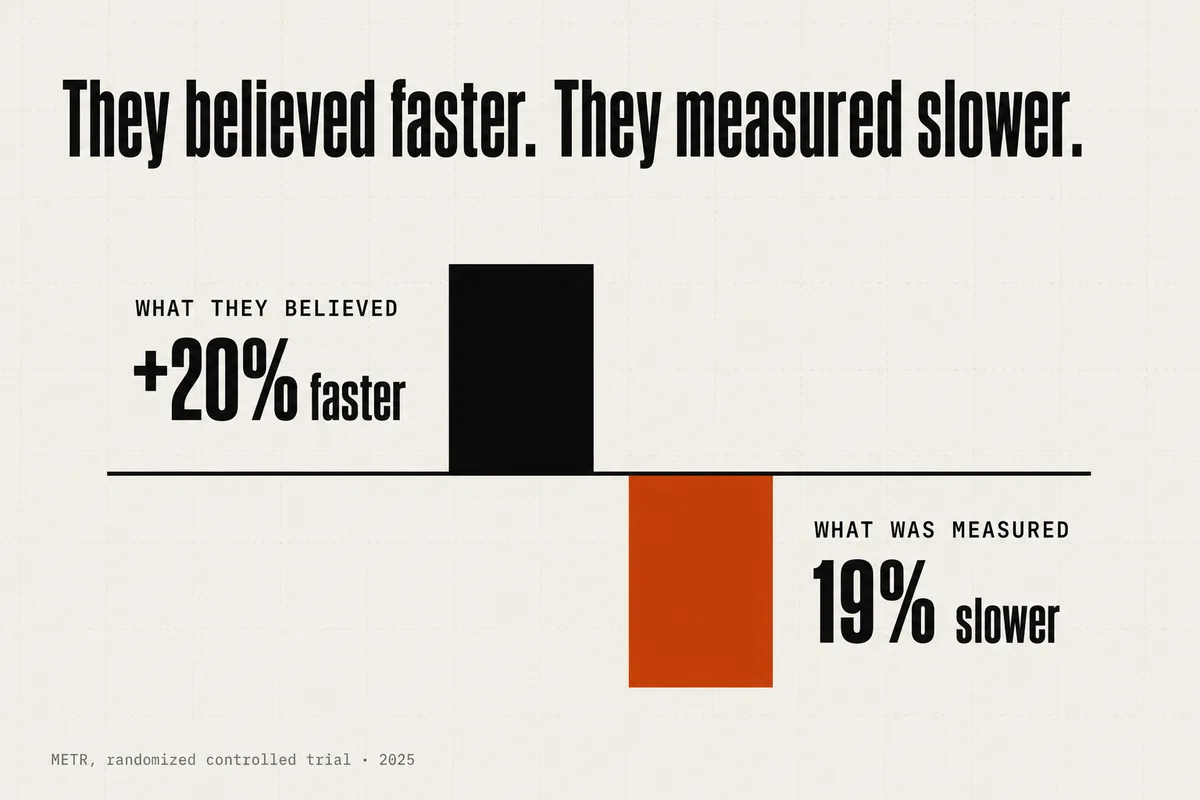
The reliability evidence for unattended agents is sobering and tool-agnostic. METR’s randomized controlled trial found experienced developers were 19% slower with AI tooling on large, familiar codebases — while believing they were roughly 20% faster. Independent testers at Answer.AI ran Devin for a month on real tasks and found it completed 3 of 20 satisfactorily, with 14 outright failures. Their core finding was not the failure rate but the unpredictability: “even tasks similar to our early wins would fail in complex, time-consuming ways.” Running five of those in parallel does not fix the underlying reliability. It parallelizes it. That is the question the Agent Manager has to answer for your codebase specifically, and no demo can answer it for you.
Planning and task decomposition
What you can do with it: choose how much ceremony a task gets. Antigravity has two named execution modes. In Planning mode, the agent does not start writing code. It produces an implementation plan first — goal statement, tech-stack choice, the list of steps, the files it intends to touch — then a granular task list, and it pauses for your approval before proceeding. In Fast mode, for edits with an obvious solution, it executes immediately: “no plans, no artifacts, no waiting for approval.” The sequencing during planning, per Google’s own codelab, runs implementation plan, then task list, then code, then a closing walkthrough.
This is the part of the product a team will feel most immediately. For a multi-component feature or a large refactor, being handed an editable plan before any code moves is genuinely useful — you catch a wrong tech-stack assumption in the plan review, not in the diff. The feedback loop is Google-Docs-style commenting, which we cover in the Artifacts section.
The sharp edge is that the approval gate is not as firm as the framing suggests. A named Google Developer Expert, Mete Atamel, documented in a hands-on walkthrough that “sometimes, Antigravity goes to straight coding after creating an implementation plan and task list without waiting for you to confirm.” You can still comment and submit retroactively, but the guarantee you might assume from “Planning mode” — nothing happens until I approve — is softer in practice than in the pitch. For a pilot, that is worth testing directly: give it a plan you have a reason to reject, and see whether it waits.
Autonomous multi-step execution
What you can do with it: hand the agent a task that spans writing code, launching the application, testing components, and iterating — with the human intervening at checkpoints rather than every step. Google’s stated scope covers background maintenance and bug fixes, UI iteration, and progress reported through Artifacts. The demos are broad: an Android build via CLI, a macOS Finder extension in Swift, a full frontend/backend/database stack orchestrated through Docker Compose. Those are single, Google-curated demonstrations from one engineer’s workflow, not reproduced benchmarks, and we read them as illustrative of the ceiling, not the median.
The independent hands-on record is more instructive because it shows both edges at once. InfoWorld’s reviewer watched the agent improvise a genuine workaround — when a library lacked a feature, it “generated a custom XML fragment to be inserted into the document, since the Office XML library used for the project didn’t support that as an option.” That is the good version of autonomy: the agent hit a wall and engineered around it.
The sharp edge is in the same review. The same agent “duplicat[ed] an entire section of the code for my project. It caught the mistake, but only by chance while working on an unrelated part.” Read that carefully. The error was not caught by a verification step. It was caught by luck. And a smaller, quieter failure mode: moving an Antigravity project directory elsewhere on the system can break things silently, “like the retention of Knowledge Items.” Autonomous execution that improvises well and also duplicates a code section by accident is exactly the profile the reliability numbers predict — capable in the moment, unreliable across the whole task, and dependent on a human noticing what went wrong.
Tool access and MCP
What you can do with it: give agents three native command surfaces — editor, terminal, and browser — plus a real integration layer. Antigravity supports the Model Context Protocol natively, with an in-IDE MCP Store for browsing and installing servers and a custom mcp_config.json for hand-rolled ones. The concrete payoff is the same as MCP everywhere: connect agents to your databases, file parsers, internal tools, and remote APIs without writing bespoke glue. Google’s cited example is Flutter/Dart hot reload delivered through an MCP server.
Two adjacent features round out the context story. A persistent per-project Knowledge base lets agents save context and snippets across sessions. Skills are pre-packaged context bundles — a design system, an API’s docs — that the agent consults instead of searching raw documentation. Davis’s description is the clearest: “It’s literally a cheat sheet for the agent.” Terminal execution is gated by a configurable Security Preset that decides whether commands need pre-execution review or run automatically.
The sharp edge here is narrow but real for enterprise buyers: Antigravity reportedly does not support the MCP OAuth spec’s client-ID/secret flow. It handles built-in Google credentials, automatic OAuth, and custom HTTP headers, but the missing client-credentials path limits some agent-identity use cases where your security team wants a first-class machine identity rather than a borrowed user session. If your MCP integrations depend on that flow, verify it before you commit. And MCP itself is not an Antigravity invention — it was popularized by Claude Code and is now assumed infrastructure across the category. Native MCP support is table stakes, not a differentiator.
Browser control
What you can do with it: let an agent drive a real browser to verify its own work — click through a flow, scroll, type, capture the DOM, take screenshots, read console logs, inspect network requests, and record video of the session. This is the capability behind the “the agent tested the UI for you” pitch, and it is architecturally distinct from the coding agent. Browser control runs through a dedicated browser subagent built on Gemini 2.5 Computer Use — a separate, older, computer-use-specialized model, not Gemini 3 with a browser tool bolted on. It is invoked by an explicit /browser command, because, per Google’s own framing, the agents “were not capable enough to determine exactly when to be using the browser.” Under the hood, independent reverse-engineering found a Chrome extension running an HTTP server that wraps the Chrome DevTools Protocol.
For a team, the appealing version is end-to-end: the agent writes a feature, opens the app in Chrome, walks the happy path, and hands you a video and screenshots as evidence. When it works, that shortens the distance between “the agent says it’s done” and “I believe it.”
The sharp edge is that it does not reliably work, and the failure is quiet. InfoWorld’s reviewer pointed the browser subagent at RogerEbert.com to scrape movie titles; it “scrolled down slightly… and missed a few of the titles at the very top of the page.” Their conclusion is the one that should give a technical buyer pause: “writing a script to automate the scraping generated more reproducible results” than the browser agent. A verification tool that is itself inconsistent does not verify — it produces a screenshot that looks like verification. That distinction is the whole game, and it leads directly to the security problem, which is the sharpest edge in the entire product.
Verification and Artifacts: the best-built part
What you can do with it: review an agent’s work the way you review a document, not by reading raw logs. This is Antigravity’s most distinctive and best-documented feature, and it is genuinely well-built. Instead of a scrolling terminal, the agent produces Artifacts — task lists, implementation plans, screenshots, browser recordings, and a closing walkthrough that summarizes what it did and offers evidence it worked. Google’s own line: agents “generate tangible deliverables… that allow you to verify the agent’s logic at a glance.”
Review is modeled on Google Docs. You “leave feedback directly on the Artifact — similar to commenting on a doc — and the agent will incorporate your input.” One operational detail matters: comments must be explicitly submitted to take effect. As Atamel warns, “whenever you add a comment to the plans or tasks, make sure you remember to submit the comment. This is what triggers Antigravity to update its plans.” At the code level, a diff gives you three choices — accept all, reject all, or review changes line by line. The walkthrough is the async checkpoint: the agent verifies its own work, often via the browser subagent, and reports back.
InfoWorld’s reviewer, who caught the duplicated-code bug, still rated this loop the strongest part of the tool: “task lists, implementation plans, and walkthroughs allowed developer oversight at each step with inline commenting capabilities.”
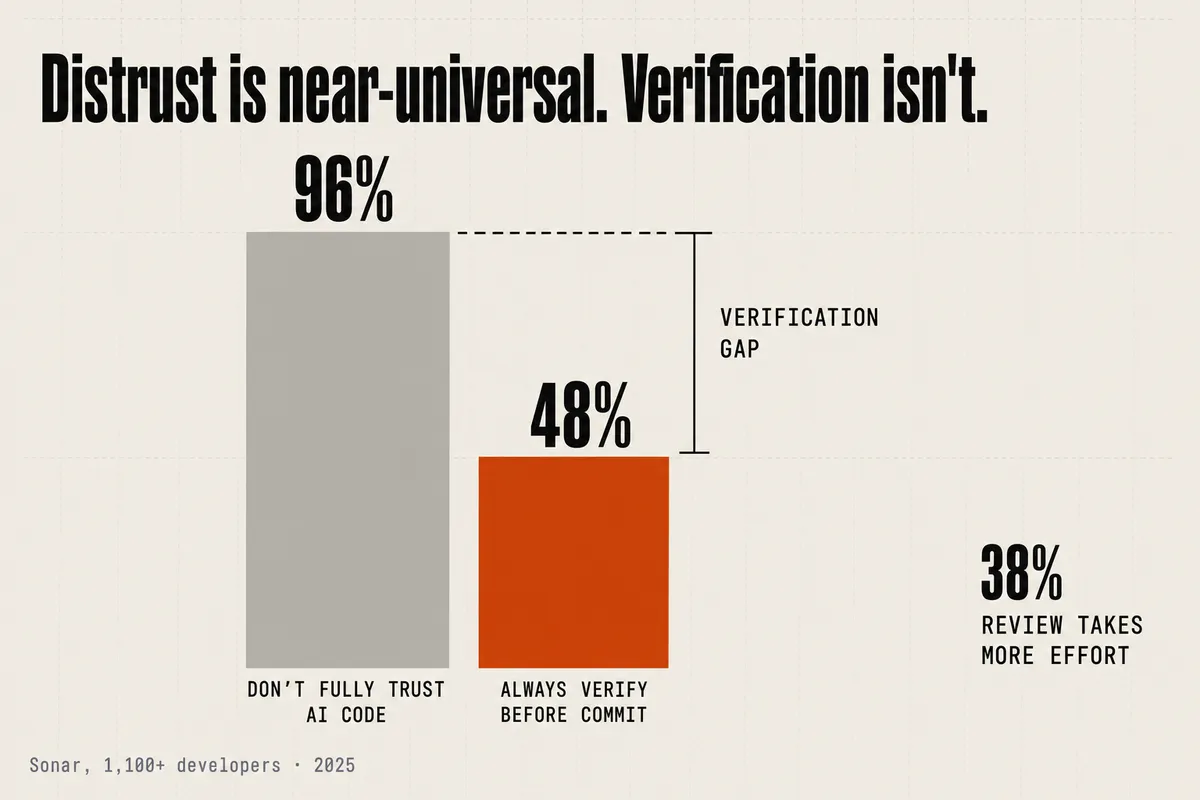
The sharp edge is the one worth thinking hardest about, because it is a matter of what the feature can and cannot change. Artifacts make review nicer. They do not make there be less to review. The bottleneck in AI-assisted engineering has shifted from writing code to verifying it, and the numbers are stark. Sonar’s survey of over 1,100 developers found 96% do not fully trust AI-generated code to be correct, yet only 48% say they always verify it before committing; 38% said reviewing AI code takes more effort than reviewing human code. A commentable walkthrough improves the ergonomics of the 48%. It does nothing about the volume of code piling up behind it, and if anything a smoother review UX encourages you to run more agents, producing more to review. The pile grows. Antigravity optimizes the review experience. It does not shrink the review load. Any team piloting it should measure the second thing, not the first.
Model backing: the genuinely distinguishing part
What you can do with it: pick the model per agent and per task, across three frontier families in one client. This is where Antigravity has a real, defensible advantage. The default is Gemini 3.1 Pro, with Gemini 3 Flash for high-volume work — but you can also select Claude Sonnet 4.6, Claude Sonnet 4.6 with Thinking, Claude Opus 4.6 with Thinking, and OpenAI’s GPT-OSS-120B. Against single-model competitors — AWS Kiro is limited to Claude Sonnet variants — that is a genuine distinction, not packaging. You can route a typed-language refactor to Claude, boilerplate to Gemini Flash, and a hard reasoning task to Opus, inside one workflow. For a team that has opinions about which model is best at what, that flexibility is the most concrete reason to look at Antigravity at all.
Google’s headline benchmark numbers are strong, and here we have to be precise about what they measure. Gemini 3 Pro posts 76.2% on SWE-bench Verified, 1487 Elo on WebDev Arena, 54.2% on Terminal-Bench 2.0, and a 1-million-token context window. Those are Gemini 3 Pro model benchmarks, published by Google for the model. They are not Antigravity benchmarks. Antigravity is the harness the model runs in, and a harness can squander a good model or flatter a mediocre one. Nobody has published a controlled measurement of the platform as a whole, so the honest read is: the model underneath is strong on paper, and the paper is about the model.
The sharp edge cuts twice. First, benchmark scores do not transfer cleanly to real work — models reportedly lose 15 to 35 points moving from SWE-bench Verified to the harder, more realistic SWE-bench Pro. A 76.2% on Verified is not a 76.2% on your backlog. Second, and more pointed: some developers on Google’s own forum allege the in-app model labels do not match what is actually served — one thread claims “Gemini 3 Pro is actually Gemini 2.0 Flash.” We have found no corroboration and no Google response, so we state it as exactly what it is — an unverified user allegation, not a fact — but it is the kind of allegation a pilot can settle for itself by watching latency and output quality against a known baseline.
Latency is worth watching on its own terms. A named developer on the same forum, Rodolfo Berardini, wrote a widely-read thread arguing that Gemini 3.1 Pro’s benchmarks went up while day-to-day usability went down — reporting a time-to-first-token around 35 seconds (“I’m staring at a cursor for half a minute”) and, separately, an account “locked until March 11th after normal development work” under the quota enforcement. Those are one user’s complaints, not a measured platform property, and we read them as such. But they point at an evaluation dimension the benchmark slide never shows: a model that scores well and responds slowly, inside a client that can lock you out mid-task, is a different tool in practice than the one on the leaderboard. Measure the wall-clock feel, not just the score.
Where the human stays in the loop
What you can do with it: set the level of oversight rather than accept a fixed one. The human-in-the-loop mechanism in Antigravity is not a separate feature — it is the Artifacts-and-commenting system, plus two dials. The Security Preset governs whether terminal commands need pre-execution approval. Browser automation requires an explicit, human-granted Chrome debugging permission at session start. And the Planning-versus-Fast choice sets how much review ceremony exists at all — Fast mode removes the checkpoints entirely. Oversight is a user-selected setting, not a platform guarantee.
The most useful framing came from Davis in the Agent Factory episode, and it is worth taking seriously even though the wrapper is a marketing series. He argues review should be risk-weighted, not uniform: hard scrutiny on backend API contracts and schemas, visual-only checks on frontend and marketing output. He recommends writing the first instance of a pattern by hand so the agent can copy it across the codebase — human-in-the-loop as architecture-setting, not per-diff babysitting. He also frames maintenance as “being a Bonsai artist: constantly pruning to keep things simple,” on the argument that poor codebase health, not context windows, is the biggest bottleneck in AI speed. That is a more honest engineering claim than “100x,” and it comes from the same source.
The sharp edge is that the same tool surface enabling all of this — editor, terminal, and browser access in one agent loop — is the attack surface, and it has already been exploited against this specific product. Independent security researchers at Pillar Security and PromptArmor found, and Google patched, an indirect-prompt-injection chain that escalated to remote code execution and sandbox escape via Antigravity’s native file-search tool: hidden instructions inside an innocuous file bypassed the sandbox. Separately, Antigravity’s default browser allowlist shipped with webhook.site — a public request-logging service — on it, a ready-made exfiltration channel for a prompt-injection attack. Google fixed both. The lesson is category-wide, as the security commentary put it: “every native tool parameter that reaches a shell command is a potential injection point.” An agent you have granted terminal and browser access is an agent an attacker would very much like to reach through a poisoned dependency or a malicious file. The oversight dials are not just for correctness. They are the security boundary.
Pricing: date every number
Pricing has moved repeatedly, so treat every figure below as time-stamped and verify against the live page before you rely on it. Antigravity launched free in preview (November 2025) with “generous rate limits.” In December 2025, the free tier’s daily request allowance was reportedly cut from 250 to 20. In March 2026, Google replaced time-based quotas with a credit system (reported at $25 per 2,500 credits, with the credit-to-usage conversion left undocumented), which drew public backlash over unexplained drains. At I/O 2026 (May 19), Google re-tiered again: an AI Ultra tier at $100/month (5x Pro limits) and a top tier cut from $250 to $200/month (20x Pro limits). Four pricing regimes in roughly six months. For a buyer, the volatility itself is the signal — budget for a moving target, and do not build a cost model on any single quoted number.
What is genuinely new, and what is repackaged
Here is the honest accounting, because it is the thing a technical buyer actually needs. Almost every capability in Antigravity has a dated predecessor, and most predate it by a year or more.
Orchestrator-spawning-parallel-subagents was pioneered commercially by Devin — “Devin can now manage Devins” — and matched by Cursor’s Cloud Agents (“run as many agents in parallel as you want”) and Anthropic’s own published multi-agent research system. Plan-then-execute reviewable artifacts came from Claude Code’s Plan Mode (an editable plan.md), GitHub Copilot’s coding agent (a task checklist inside the PR), and most directly from Amazon Kiro’s spec-driven flow — requirements, then design, then tasks — which is the closest antecedent to Antigravity’s artifact set. Editor-plus-terminal-plus-browser in one loop was already Cursor’s Agent Mode and Devin’s VM-plus-browser-plus-shell environment. Async off-machine execution is Cursor Background Agents, Copilot’s coding agent, and OpenAI Codex. MCP as the integration layer came from Claude Code. And the academic root under all of it is Princeton’s SWE-agent (NeurIPS 2024), which established that “language models are a new kind of end user” needing their own tool interfaces — described as the single most-imitated idea in coding agents today.
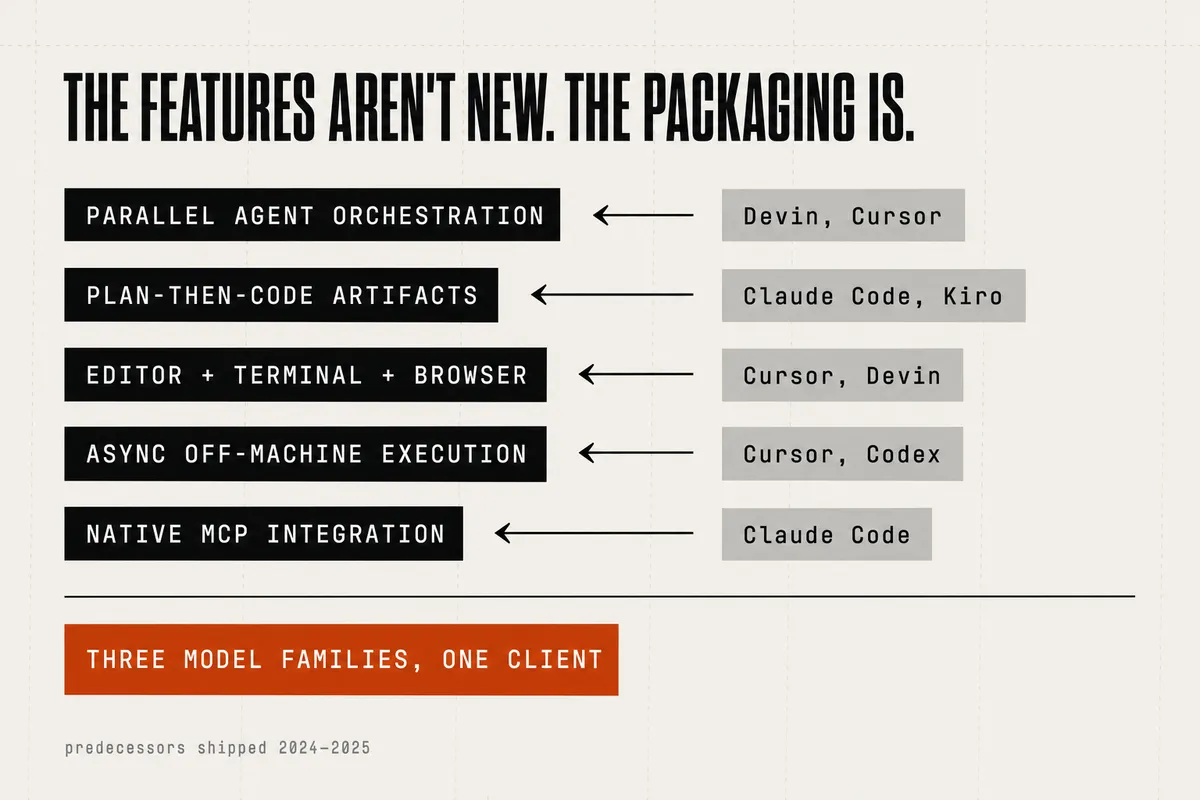
There is even a feature Antigravity lacks that a direct competitor shipped first: Kiro’s event-driven “Agent Hooks,” which fire automated actions on save or create, have no clean Antigravity equivalent. So the architecture is not new, and it is not uniformly ahead. What is actually different about Antigravity is packaging and distribution: free or generous access to three frontier model families in one client, and an unusually polished commentable-artifact review surface. Both are real. Both are useful. Neither is a new capability class. That is a distribution-and-UX story, and it is a legitimate one — but it is a different claim than “100x engineering,” and the gap between those two claims is exactly where a skeptical evaluation should live.
For a pilot, that reframes the decision cleanly. You are not evaluating a leap past Cursor, Copilot, Claude Code, and Devin. You are evaluating whether multi-model flexibility and a better review surface, in one free-to-generous client, are worth the switching cost — against a tool that carries the category’s unsolved reliability problem, added and then patched a remote-code-execution hole, and reprices itself every quarter. Run it on a real task with a plan you intend to reject, watch whether it waits, measure how much of your week the review pile eats, and check the model latency against a baseline you trust. The capability map is broad and much of it is well-built. The one number that matters for your team is not on Google’s slide: it is how much you have to verify, and whether this tool made that pile smaller or just easier to look at. On the current evidence, it makes it easier to look at.
References
- Google Developers Blog — Build with Google Antigravity, our new agentic development platform
- Google — Gemini 3: model benchmarks (SWE-bench Verified, WebDev Arena, Terminal-Bench 2.0, 1M context)
- Google Cloud — Agent Factory recap: “100x engineering with AI agents in Google Antigravity 2.0”
- TechCrunch — Google launches Antigravity 2.0 at I/O 2026
- Google Codelabs — Getting Started with Google Antigravity
- Mete Atamel — Provide Feedback to Google Antigravity
- InfoWorld — A first look at Google’s new Antigravity IDE
- Alok Bishoyi — Reverse Engineering Antigravity’s Browser Automation
- devclass — Users protest as Google Antigravity price floats upward
- METR — Measuring the impact of early-2025 AI on experienced developer productivity (19% slower)
- Answer.AI — Thoughts on a month with Devin (3 of 20 tasks)
- Sonar — Data reveals critical verification gap in AI coding (96% / 48%)
- Morph — SWE-bench Pro leaderboard (Verified-to-Pro drop)
- The Hacker News — Google patches Antigravity IDE flaw enabling prompt-injection code execution
- Pillar Security — Prompt injection leads to RCE and sandbox escape in Antigravity
- CNBC — Google hires Windsurf CEO in $2.4B AI talent deal
- TechCrunch — Cognition, maker of Devin, acquires Windsurf
- Cognition — Devin can now manage Devins
- Yang et al. — SWE-agent: Agent-Computer Interfaces Enable Automated Software Engineering (arXiv, NeurIPS 2024)
WEEKLY NOTE
One note per week.
One short note from current work plus 2–3 outside links worth your time.

Oleksandr Kotliarov
Founder · Engineering Lead · Kraków, Poland
I build engineering teams that ship — from MVP to Series A delivery.