Google's data agents and MCP Toolbox: what they're for and how to set one up
Author
Oleksandr Kotliarov
Date
July 7, 2026
Reading Time
16 min
Google’s June 16 announcement put about twenty products under one phrase: the “agentic data cloud.” Strip the umbrella and there are two different things underneath. One is a roadmap of preview agents that promise to answer questions about your data in plain language. The other is a single, generally available, open-source server that lets an agent run queries you defined against the databases you already have. The first is interesting. The second you can use this week, and it’s the part this piece is built around.
The purpose is narrow and worth stating plainly: you want an agent (a chatbot, an internal tool, a coding assistant, a scheduled job) to read from or act on your operational data, without handing a language model a database password and hoping it writes safe SQL. That problem has a clean answer now, and most teams will reach for it long before they need anything Google is still calling “preview.”
This article has two halves. The first explains what’s actually shipped, which data sources you can connect, and what outcomes are realistic versus marketed. The second is the hands-on setup: install, configure, wire it to an agent, scope access by identity, and run it safely. If you only want the build, skip to “Setting it up.” If you’re deciding whether this belongs in your stack at all, start here.
What Google actually shipped
The announcement is easier to reason about once you sort it into what you can put in production today and what you’re betting on arriving later.
Six things are generally available. The one that matters most broadly is MCP Toolbox for Databases, an open-source server (more on it throughout). The rest of the GA set: the Data Engineering Agent for BigQuery pipeline work; the Managed MCP Servers for AlloyDB, Bigtable, Cloud SQL, Firestore, and Spanner; and three Looker pieces — embedded Conversational Analytics, the Conversational Analytics API in Looker, and an upgraded Looker core agent.
Everything else in the keynote is preview. That includes most of the headline “ask your data a question” features: Conversational Analytics inside BigQuery, across a multi-cloud Lakehouse, and over AlloyDB, Spanner, and Cloud SQL; the Data Science Agent; the Database Observability Agent; QueryData; the Data Insights Agent; a Deep Research Agent; and the Data Agent Kit. Preview features get better, and some of these will matter. But preview is not a foundation. A feature you cannot get a support SLA on, whose API can change, is something to prototype against, not to build a product dependency on.
That GA-versus-preview line is the single most useful filter for reading the announcement, because the blog post presents all twenty products with the same confident energy. The honest version: the plumbing is ready, and the autonomous “data analyst in a box” is still arriving.
The agents, and what each is for
It’s worth knowing what the named agents actually do, because the capability you need might be one specific tool rather than the whole “agentic” story.
Data Engineering Agent (GA). Generates and suggests BigQuery pipeline code from a description: transformations, scheduling, the scaffolding of a data pipeline. The important detail: it does not run autonomously. It proposes code, and a human approves before execution. Its root-cause-analysis troubleshooting is preview and gated behind Premium Support, and it doesn’t handle notebook files, Iceberg lakehouse write mutations, or external URL references. Useful as a pipeline copilot, not an unattended engineer.
Conversational Analytics (GA in Looker, preview elsewhere). The plain-language “ask a question, get a chart” capability. In Looker it’s GA and rides on your existing LookML semantic model, which is why it’s the most trustworthy version: the business logic is already defined. The Conversational Analytics API that extends this to BigQuery and operational databases is preview, and its documented limits are worth knowing before you design around it: a 1,000-row cap per database query, up to 500 GB processed per BigQuery query, accuracy that degrades on large datasets, no forecasting or anomaly detection, seven chart types, and a note that BigQuery structs “sometimes fail.” None of that is disqualifying. It’s the difference between what the keynote implies and what the product does.
QueryData (preview). Google’s bid for trustworthy text-to-SQL on operational databases, with the headline “near-100% accuracy.” That number is real but conditional: it depends on developers authoring schema ontologies, writing query blueprints, and iterating with an eval tool first. It’s a structured way to build the semantic grounding the accuracy depends on, not a shortcut around it.
Data Science Agent (preview). Notebook-oriented help for data science work, with support for BigQuery ML, DataFrames, and Spark. Database Observability Agent (preview). Monitoring and troubleshooting for your databases. Data Insights Agent, Deep Research Agent, and the Data Agent Kit (all preview). The more speculative end: automated insight generation, multi-step research over data, and a kit for assembling your own data agents. Promising directions; not things to build a dependency on yet.
The pattern across all of them: the agents that lean on an existing semantic model (Looker) or keep a human in the loop (Data Engineering) are the ones that are GA and dependable. The ones promising to figure out your data on their own are the ones still in preview. That’s not a coincidence.
The capability that’s real: a tool server in front of your data
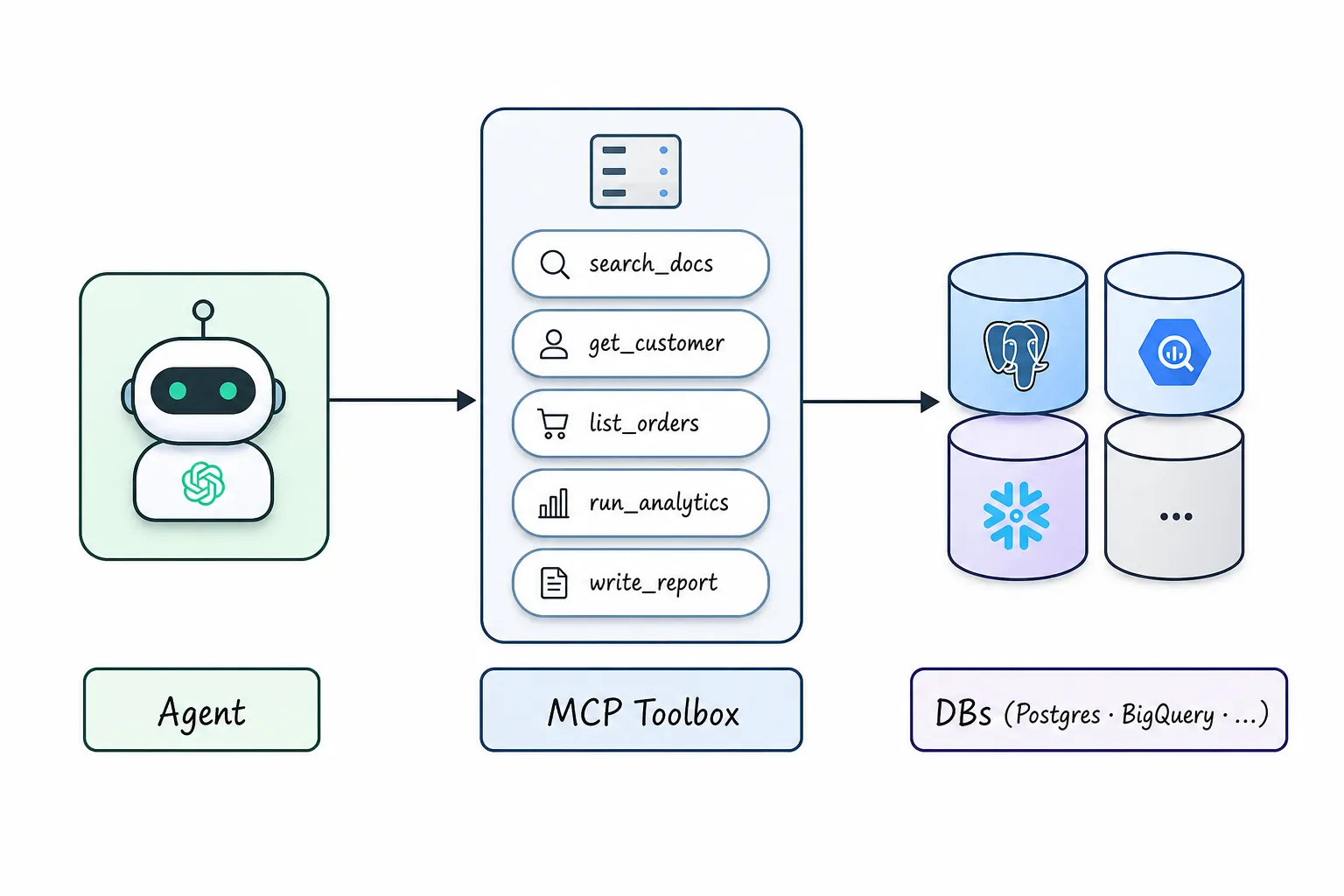
MCP Toolbox is the piece to understand first, because it’s the one most teams will actually deploy. It is a server that sits between an agent and your databases and exposes a fixed set of named, parameterized queries (“tools”) that the agent can call. It speaks the Model Context Protocol (MCP), the open standard for connecting models to external capabilities, so any MCP-compatible client and any agent framework can use it.
It went to v1.0 in April and v1.5.0 shipped on June 18. It is Apache-2.0 licensed and maintained under the googleapis org. It is not a hosted Google service you rent; it’s a binary you run wherever you want, including on a laptop or in a container next to your database, with no Google Cloud account involved.
The shift it represents is small to describe and large in practice. Without it, “let the agent query our database” means generating SQL from a prompt and executing whatever comes back — a model with a connection string and your trust. With it, the agent can only call queries you wrote and reviewed, and it supplies parameters, not SQL. The model picks from a menu; it does not write the kitchen’s recipes. That single design choice is what makes the difference between a demo and something you’d leave running against production.
Portability: why building on MCP matters
The reason to care that Toolbox speaks MCP rather than a Google-specific protocol is that it decouples three choices that vendors usually like to bundle: which model you use, which agent framework you build in, and which database you query. Because the server exposes its tools through an open standard, the same running Toolbox works whether your agent is built on LangChain, LlamaIndex, ADK, a custom loop, or an MCP-aware client like a coding assistant, and whether the model behind it is Gemini, Claude, GPT, or something you self-host.
That matters for a practical reason beyond principle. The model landscape moves every few months; the database you’re querying does not. Binding your data-access layer to whichever model was best the quarter you started is how integrations rot. An MCP server in the middle means swapping the model is a config change, not a rewrite, and the reviewed SQL in your tools.yaml outlives every model you’ll run through it. You’re building against the stable thing.
What sources you can actually connect
The reach here is the genuinely strong part, and it’s wider than “Google databases.” MCP Toolbox supports 60+ sources. On the Google side that’s AlloyDB, BigQuery, Cloud SQL (PostgreSQL, MySQL, SQL Server), Spanner, Firestore, and Bigtable. Off the Google side it covers the databases most teams actually run: PostgreSQL, MySQL, Oracle, MongoDB, Snowflake, Neo4j, Redis, Elasticsearch, CockroachDB, ClickHouse, Trino, SQLite, and more.
That breadth is the reason to treat Toolbox as infrastructure rather than a Google-ecosystem play. You can point it at a self-managed Postgres that has never touched Google Cloud, wire an agent running on any model to it, and never create a GCP project. The MCP layer and the open server are genuinely portable.
There are two ways to give an agent access to the Google-hosted databases, and the distinction matters for lock-in:
- Self-hosted MCP Toolbox (the open binary). Runs anywhere, connects to anything in the source list, no Google dependency. This is the portable path.
- Managed MCP Servers (GA for AlloyDB, Cloud SQL, Bigtable, Firestore, Spanner). These are Google-hosted HTTP endpoints. They’re convenient (read-only by default, authenticated with a Google IAM bearer token, with Cloud Audit Logs and Model Armor prompt-injection defense built in), but you cannot run them off GCP. They trade portability for not having to operate the server yourself.
If you’re already deep in Google Cloud and want IAM-native auth without running a process, the managed servers are reasonable. If you want the option to move, or you’re connecting non-Google databases, self-host the open Toolbox. Both speak the same protocol to the agent, so the agent code doesn’t change when you switch.
What you can actually build with it
It helps to be concrete about the outcomes, because “talk to your data” covers everything from a genuinely useful tool to a liability. Here is what this stack supports well today.
An internal assistant that answers from live data. A support or operations agent that can look up an order, a customer’s plan, an account’s recent activity — by calling the specific lookups you exposed, against the live database, scoped to the asking user. This is the highest-value, lowest-risk use: bounded questions, queries you wrote, read-only access.
An agent that takes actions on data, carefully. Toolbox tools can run writes, not just reads. So an agent can update a record, enqueue a job, or flag an account — but only through a tool you defined, with the SQL you control. This is where you move slowly: every write tool is an action you’ve authorized in advance, and you keep them few and specific.
A coding or analytics copilot wired to a real schema. An MCP-aware editor or notebook can call your tools to pull real rows while a developer works, instead of guessing at the schema. Because the same server works across frameworks and models, the copilot isn’t tied to one vendor’s assistant.
A natural-language reporting layer — with a caveat you’ll meet in a moment. You can let people ask questions in plain language and have the agent choose among your tools to answer. This works best when the questions map to queries you anticipated. It works worst, and most dangerously, when you let the model write arbitrary SQL against raw tables. The difference is entirely in how you configure it, and it’s the through-line of the build section.
The realistic frame: this is excellent at giving an agent governed, identity-scoped access to data through a controlled surface. It is not a replacement for a data team, a semantic model, or a review process. The teams that get value treat it as a careful integration layer. The teams that get burned treat it as a mind reader.
When to reach for this, and when not
Reach for Toolbox when an agent needs to read or act on live operational data, the useful questions are knowable in advance so you can express them as specific tools, and access has to be scoped per user or tenant. Internal assistants, customer-facing lookups, copilots wired to a real schema, and bounded write actions all fit this shape well.
Be more cautious when the use case is open-ended exploratory analytics, where users will ask questions you can’t anticipate and the value depends on the agent composing novel queries against raw tables. That’s the case with the worst accuracy and the highest blast radius, and it’s where you most need a maintained semantic layer (and a human reading the results) rather than a tool server alone. You can still use Toolbox there — but as one piece of a larger setup that includes the modeling and review the next sections describe, not as the whole answer. And if your need is really a static dashboard of known metrics, a conventional BI tool is simpler and safer than any agent; don’t reach for an LLM because it’s the thing in the announcement.
The benefits, precisely
The reason to run Toolbox rather than hand-roll an agent-to-database layer is that it handles, out of the box, the parts you’d otherwise get subtly wrong:
- A tool boundary instead of raw SQL generation. The agent calls named queries with parameters. You review the SQL once, at config time, not on every model output.
- Connection pooling. An agent loop can fan out into many calls; Toolbox pools connections so you’re not opening one per query.
- Identity-aware auth. It supports OAuth 2.1 and, more importantly, authenticated parameters: it can pull a claim out of the caller’s OIDC token and bind it into a query server-side, so per-user row scoping is enforced by the server rather than trusted to the model. This is the feature that makes multi-tenant access defensible.
- Observability. OpenTelemetry tracing is built in (count on a few milliseconds of overhead per query), so the agent’s database activity shows up in the same tracing you already run.
None of these is glamorous. All of them are things a hand-written integration tends to skip until an incident forces the issue.
What you still own
Toolbox solves access, safety surface, and plumbing. It does not solve correctness, and the gap between those two is where the “talk to your data” pitch quietly oversells. Before the build, the honest accounting of what stays your responsibility.
The silent wrong answer. A model that turns a question into SQL does not fail with an exception when it’s wrong. It returns valid, runnable SQL that produces a confident, wrong number — joins orders to products, skips the subscriptions table that holds the real billing logic, and hands back a clean figure nobody questions. On real enterprise schemas the accuracy is far below demo numbers: on Spider 2.0, a benchmark with schemas over 3,000 columns, GPT-4o scored 10.1% and o1-preview 17.1%. The friendlier BIRD benchmark puts top models around 75% against a human baseline near 93%, and most of the failures are not syntax — they’re schema-level: wrong column, missed join, a business term read differently than your finance team means it. dbt Labs’ 2026 benchmark names the distinction that matters: a semantic-layer miss throws an error, a text-to-SQL miss returns a wrong answer. For any number that lands in a report, an invoice, or a filing, “it ran fine” is not a control.
The semantic layer. That accuracy gap closes when the model queries against a maintained model of your business logic rather than raw tables. dbt’s reproducible benchmark shows the same models jumping from the high-80s/90s on raw text-to-SQL to near-perfect with a semantic layer in front. Google’s own answer to this, QueryData, reaches its advertised “near-100% accuracy” only after developers author schema ontologies, write query blueprints, and iterate with an eval tool — work Google’s own post calls “laborious.” Whichever route you take (narrow Toolbox tools, dbt models, LookML, or QueryData context sets), someone owns and maintains that layer. The agent consumes it; it does not replace it.
Lock-in gravity. It isn’t at the MCP layer — that part is open and portable, and Google deserves credit for shipping it that way. The pull accumulates above it: Managed MCP Servers need Google IAM, and the semantic and orchestration pieces (Knowledge Catalog, LookML, QueryData context sets, Gemini, Vertex) are proprietary. The data is portable; the modeling and orchestration you build on top of it are the switching cost. Plan where you want that line to sit.
Accountability. Decide, before you ship, who is answerable when an agent states a number that turns out wrong. That’s a governance question, and no server configuration answers it.
None of this is a reason to wait. It’s a reason to build the thing deliberately — which is exactly what the setup below does.
Setting it up
You can have Toolbox talking to a real database in an afternoon. The order is: install the server, define your sources and tools, run it, wire it to an agent, then scope access by identity and harden it. Do these against a non-production database first.
Install
Grab the binary (swap the os/arch for your machine):
export VERSION=1.5.0
curl -L -o toolbox https://storage.googleapis.com/mcp-toolbox-for-databases/v$VERSION/linux/amd64/toolbox
chmod +x toolbox
Homebrew and a container image are also published:
brew install mcp-toolbox
# or
docker pull us-central1-docker.pkg.dev/database-toolbox/toolbox/toolbox:1.5.0
Nothing here needs a Google Cloud account. The binary runs on your laptop, a VM, or a container beside your database.
Define what the agent can do
Configuration lives in a tools.yaml file with three kinds of block: a source (a database connection), a tool (one parameterized query), and a toolset (a named group of tools loaded together). Each block starts with kind:, and multiple blocks are separated by ---.
Start with a source pointing at your Postgres:
kind: source
name: my-pg-source
type: postgres
host: 127.0.0.1
port: 5432
database: toolbox_db
user: toolbox_user
password: my-password
Then define a tool. This is where the safety lives: you write the SQL, and the model only supplies the parameters.
kind: tool
name: search-hotels-by-name
type: postgres-sql
source: my-pg-source
description: Search for hotels based on name.
parameters:
  - name: name
    type: string
    description: The name of the hotel.
statement: SELECT * FROM hotels WHERE name ILIKE '%' || $1 || '%';
The description fields are not decoration. They are the only thing the model sees when it decides which tool to call and what to pass. A vague description gets the wrong tool called with the wrong argument. Write them like API docs for a literal-minded junior engineer: say exactly what the tool returns and what each parameter means.
Most real setups have several tools per source. A second one, for booking by date, shows how parameters stack:
kind: tool
name: list-hotels-by-location-and-dates
type: postgres-sql
source: my-pg-source
description: List hotels in a city with availability between two dates.
parameters:
  - name: city
    type: string
    description: City to search in.
  - name: check_in
    type: string
    description: Check-in date, YYYY-MM-DD.
  - name: check_out
    type: string
    description: Check-out date, YYYY-MM-DD.
statement: >
  SELECT id, name, nightly_rate FROM hotels
  WHERE city = $1
    AND id NOT IN (SELECT hotel_id FROM bookings WHERE $2 < end_date AND $3 > start_date);
Group the tools you want available together:
kind: toolset
name: hotel_tools
tools:
    - search-hotels-by-name
    - list-hotels-by-location-and-dates
A toolset is what an agent loads. When a user asks “find me a room in Kraków next weekend,” the model sees the two tool descriptions, picks list-hotels-by-location-and-dates, extracts the city and dates as parameters, and the server runs your reviewed SQL — the availability join included, because you wrote it, not the model. The agent never sees the schema or composes a query; it fills in a form you designed.
Keep credentials out of the file with environment interpolation: password: ${DB_PASSWORD} reads from the environment, and ${DB_PASSWORD:dev-only} supplies a fallback for local work.
A note on tool design, because it’s the most consequential decision you’ll make here: prefer many narrow, specific tools over one general run_sql escape hatch. A tool called get_active_subscriptions_for_account that wraps the correct join is your cheapest semantic layer — it encodes the business logic once, in reviewed SQL, instead of asking the model to rediscover it every call. The temptation to expose a single “run any query” tool is exactly the path back to the silent-wrong-answer problem.
Run it
./toolbox --config "tools.yaml"By default it listens on 127.0.0.1:5000 and exposes the MCP endpoint at http://127.0.0.1:5000/mcp. Add --ui to launch a browser tester where you can fire each tool by hand and confirm the SQL does what you meant before any agent touches it. Do that first. A tool that returns the wrong rows in the tester will return the wrong rows to your agent, just less visibly.
Wire it to an agent
For application code, the Python SDK is the shortest path:
pip install toolbox-corefrom toolbox_core import ToolboxClient
async with ToolboxClient("http://127.0.0.1:5000") as toolbox:
tools = await toolbox.load_toolset("hotel_tools")
# `tools` are now callable functions you hand to your agent frameworkThere are thin adapters for the common frameworks (toolbox-langchain, toolbox-llamaindex) and a JavaScript SDK (@toolbox-sdk/core) with the same shape. If you’d rather drive it from an MCP-aware editor or desktop client, point the client at the HTTP endpoint:
{ "mcpServers": { "toolbox": { "type": "http", "url": "http://127.0.0.1:5000/mcp" } } }At this point an agent can answer questions against your database using only the queries you sanctioned. Everything past here is about making it safe to leave running.
Scope access to the caller, not the prompt
For anything multi-tenant or user-specific, the feature to use is authenticated parameters. Toolbox can read a claim out of the caller’s verified OIDC token and bind it to a query parameter on the server, so a value like the tenant or user ID never passes through the model. The agent asks for “my orders”; the server fills in the identity from the token and runs WHERE user_id = $1 with it.
The shape is an auth service plus a parameter sourced from the token rather than the model:
kind: authService
name: my-google-auth
type: google
clientId: ${GOOGLE_CLIENT_ID}
The tool then requires that auth and pulls the user from the token instead of trusting the model to scope its own query. The exact keys for binding a claim have shifted across releases, so confirm them in the configuration reference for the version you installed rather than copying a snippet blind. The principle is the durable part: row-level access decided by a verified token, not by a sentence the model generated. This is how you give an agent access to a shared database without giving every user access to every row.
Harden and observe
Before this runs anywhere but your laptop:
- Keep tools read-only unless a write genuinely needs to be agent-driven, and keep write tools few and specific.
- Bind the network surface. Set
--addressto an interface you control, set--allowed-hostsand--allowed-originsto stop DNS-rebinding and stray cross-origin calls, and terminate TLS for anything off localhost. - Don’t leak columns. Toolbox does not mask PII for you. If a column shouldn’t reach the model, don’t
SELECTit; the tool’s SQL is your data-minimization boundary. - Watch cost. Agent loops multiply queries, and pay-per-operation sources (Spanner, Bigtable, BigQuery) bill accordingly. Put limits on result sizes in your SQL.
- Trace it. Point
--telemetry-otlpat your OpenTelemetry collector so the agent’s database activity lands in the tracing you already watch.
Where to run it in production
“Runs anywhere” needs a concrete topology once you’re past a laptop. The common pattern is to run Toolbox as its own process close to your application (a sidecar container in the same pod, or a small service in the same private network as the database) and keep its HTTP endpoint off the public internet. The agent talks to Toolbox; Toolbox talks to the database; only your application talks to the agent. Each tenant that needs hard isolation gets its own Toolbox instance with its own source credentials, rather than one shared server trying to enforce separation internally. The container image makes this straightforward to deploy on whatever you already run, and because the server is stateless between requests, you can scale it horizontally behind a load balancer like any other small service. The database connection pool, not the server, is your scaling constraint; size it for the concurrency your agents actually generate, which an agent loop can push higher than human traffic would.
Monday morning
A concrete first pass you can do today: download the binary, write one source and two read-only tools against a non-production database, and run with --ui to confirm the SQL by hand. Wire it to one agent with toolbox-core. Add an authenticated parameter so access is scoped by token rather than by prompt. Then, before it touches anything that matters, add a review step for any number that leaves the building. The setup is an afternoon. The judgment about which queries to expose, and how their answers get checked, is the actual work, and it’s yours, not the vendor’s.
References
- MCP Toolbox for Databases (GitHub): install, the
tools.yamlschema, releases. - MCP Toolbox documentation: sources, tools, and auth configuration.
- Supported integrations / sources: the 60+ database list.
- Google Cloud: new data agents across the Agentic Data Cloud: the announcement and the GA/preview split.
- AlloyDB remote MCP server, GA: the managed-server auth model.
- dbt Labs: semantic layer vs text-to-SQL, 2026: the error-vs-wrong-answer distinction.
- Spider 2.0 benchmark: text-to-SQL accuracy on enterprise schemas.
WEEKLY NOTE
One note per week.
One short note from current work plus 2–3 outside links worth your time.
No spam. Unsubscribe anytime.

Oleksandr Kotliarov
Founder · Engineering Lead · Kraków, Poland
I build engineering teams that ship — from MVP to Series A delivery.