Author
Oleksandr Kotliarov
Date
July 14, 2026
Reading Time
7 min
Cloudflare took the know-how it uses to move enterprises onto Cloudflare One and shipped it as a set of skills you hand to an agent. Not a new product, not a rebrand of their SASE platform — the deployment and migration logic itself, packaged so an agent can read it, reason about your setup, and make the changes through the API.
That is a different kind of release, and it is easy to misread. So here is what the “Cloudflare One stack” actually is, how the pieces fit, and how you’d put it in front of your team without handing an autonomous agent the keys to your security control plane on day one.
What shipped
Two things, plus one that makes them useful.
Two skill files, published in a GitHub repo:
cloudflare-one— general product guidance. What the platform does, how the components relate, how to deploy and manage them.cloudflare-one-migration— vendor-translation logic. It maps another vendor’s configuration onto Cloudflare One equivalents.
The Cloudflare code mode MCP server — a typed interface to the Cloudflare API. This is the part that turns advice into action. Skills on their own are text an agent reads; paired with the MCP server, the agent can actually create policies, connect tunnels, and change configuration through a real API surface.
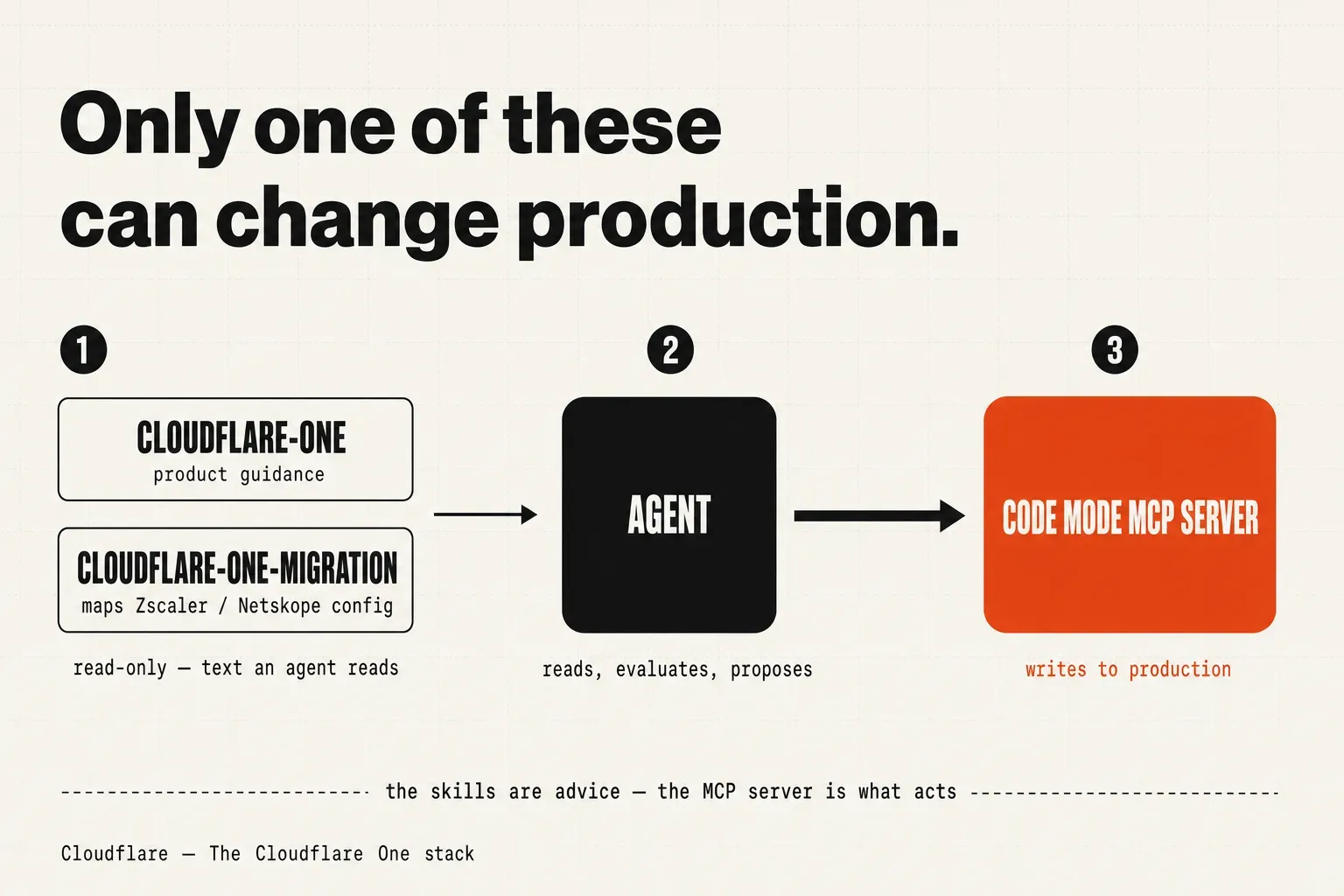
The framing from Cloudflare is direct: this is “a set of skills you give to your agent to configure, deploy, and manage your Zero Trust environment.” The skills are meant to be lightweight and composable — used standalone, layered with your own context, or built on top of.
One honest note on novelty. The migration logic is not new. It is the same logic behind Cloudflare’s Descaler and Deskope programs, their assisted migrations off Zscaler and Netskope. What is new is the packaging: turning a professional-services engagement into something an agent can drive. Cloudflare’s own claim is that this has “moved enterprise customers from Zscaler and Netskope to Cloudflare One in hours rather than months.” Treat that as the ceiling, not the median — it is the vendor describing its best case.
The components the skills operate on
The skills are only as clear as your mental model of what they are configuring. The post centers these Cloudflare One building blocks:
- Access — remote access and VPN replacement. Zero Trust access to specific applications instead of a flat network tunnel.
- Gateway — the secure web gateway. User, network, device, and data filtering.
- Tunnel — outbound connectivity from your infrastructure to Cloudflare, with no exposed public IPs.
- Mesh — connectivity between network segments.
- WAN (Magic WAN) — network-level connectivity.
- Digital Experience Monitoring (DEX) — the troubleshooting and operations toolkit.
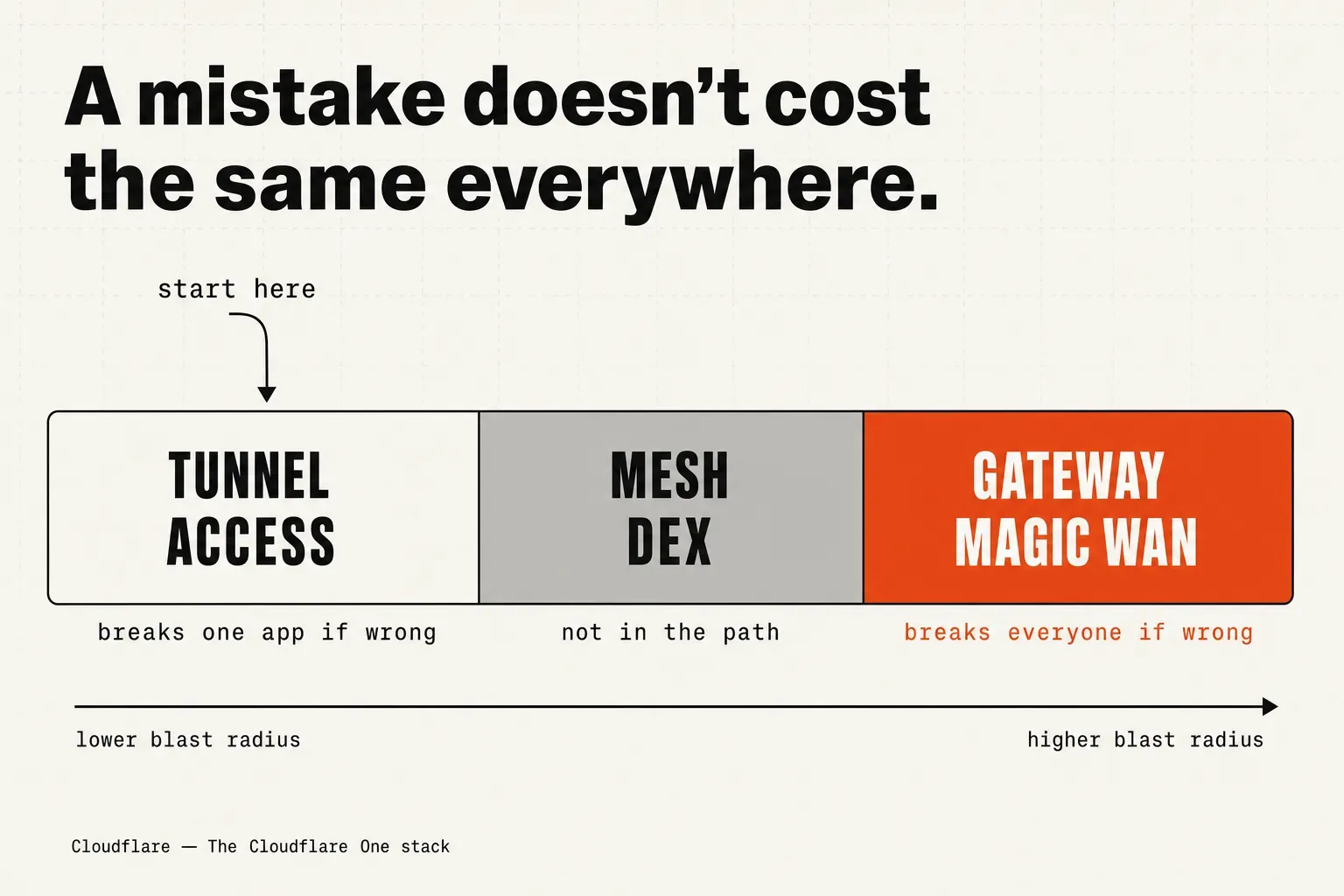
They are not equally dangerous to get wrong, and that difference is what should drive your adoption order.
Cloudflare One as a platform carries more than this — data loss prevention, CASB, email security, browser isolation. The stack announcement keeps its focus on the components above, and so will this guide. If your evaluation depends on the pieces not listed here, verify them directly rather than assuming the skill covers them.
How to actually use it
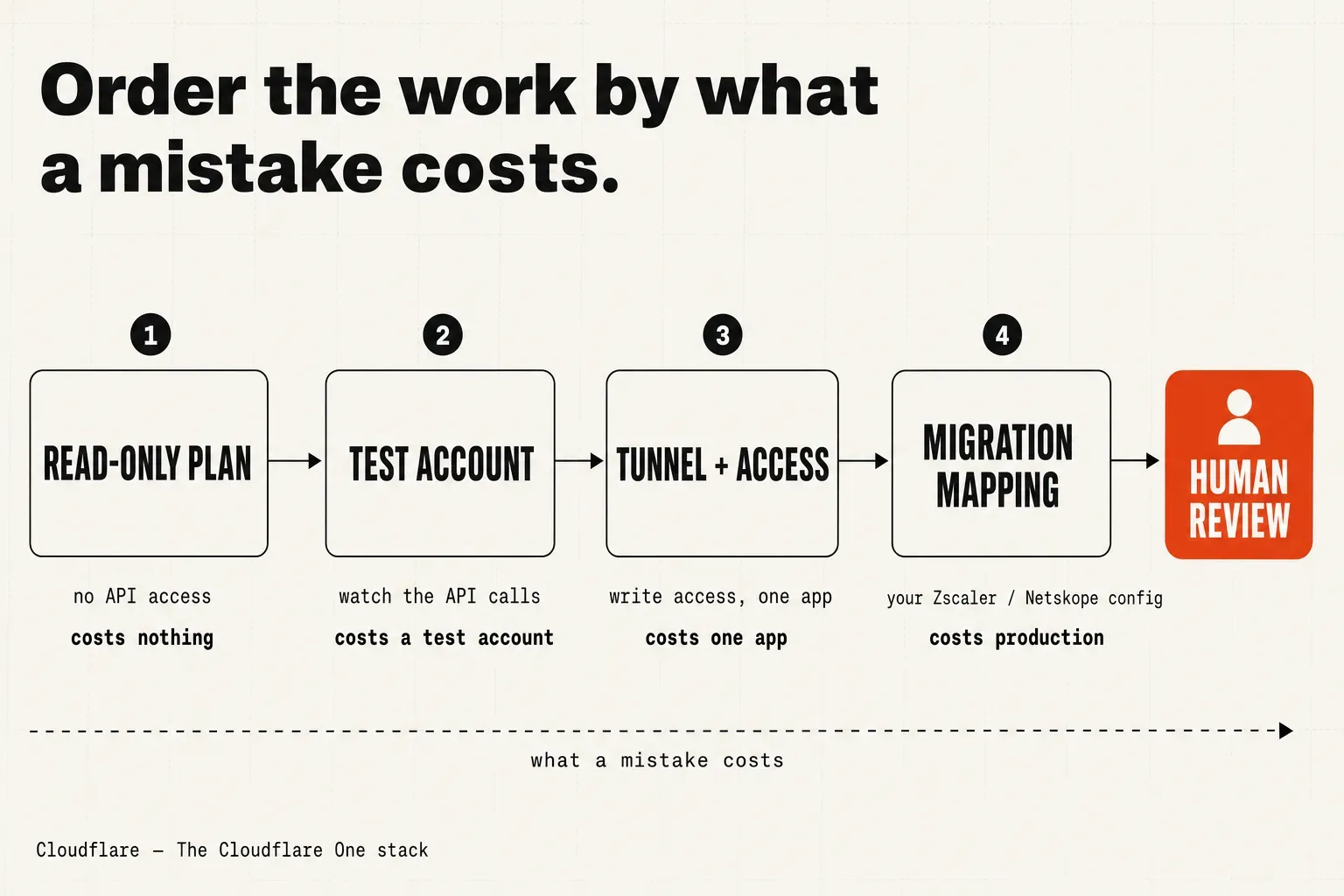
The loop Cloudflare describes is short: load the skills, pair the agent with the MCP server, let the agent evaluate and configure. The post does not prescribe an order beyond that. What follows is our sequencing, not Cloudflare’s — built to keep the blast radius small while you learn how much the agent gets right.
1. Run the skill read-only first. Load cloudflare-one without giving the agent write access to anything. Ask it to evaluate your current setup and produce a plan. You get the value of the packaged product knowledge — what maps to Access, what belongs behind a Tunnel, where Gateway policy would sit — with zero risk of it changing state. Read the plan the way you would read a new hire’s first design doc: useful, and not yet trusted.
2. Connect the MCP server in a throwaway account. The first time the agent has live API access, point it at a non-production Cloudflare account. Watch what calls it makes. The code mode MCP server is a typed interface, which means the surface is legible — you can see the shape of what the agent is doing rather than guessing. Confirm the calls match the plan before you let it near anything that matters.
3. Start with the lowest-risk primitive. Application connectivity is the safe entry point. A Tunnel plus an Access policy exposes one app to the right people and breaks nothing else if it is wrong. Get that working end to end before you let the agent touch Gateway (which sits in the path of user traffic) or Magic WAN (which sits at the network layer). Order the work by what a mistake would cost, cheapest first.
4. For a migration, generate the mapping — then stop. Run cloudflare-one-migration against your existing Zscaler or Netskope configuration. It produces a translation and a proposed sequence. This is where the “hours rather than months” claim earns or loses its keep, and it is exactly where you insert a human. The agent is good at the mechanical translation — this policy becomes that policy, this rule maps to that rule. It does not know which of your rules were load-bearing, which were dead weight from 2019, or which one silently protects a system nobody documented. Review the mapping before any cutover.
Where the human stays in the loop
The skills automate the mechanics. They do not own the judgment, and the gap between those two is the whole job.
An agent can translate a config and order the steps. It cannot tell you what policy is correct for your organization, or what must not break during the switch and at what cost. That knowledge lives with your engineers, and no skill file transfers it. The right mental model: the agent is a very fast junior who has read all the documentation and none of your incident history.
Two things get more important once deployment gets faster, not less:
The review gate. Consolidating onto one control plane raises the blast radius. When Access, Gateway, and your connectivity all live in the same policy engine, a single misconfiguration can take out application access and egress filtering at once. Speed does not reduce that exposure. It compresses the window in which a bad change goes from “typed” to “in production,” which means the human checkpoint before cutover carries more weight than it did in a months-long manual migration.
The agent’s own access. You are about to give something live API credentials to your security control plane. That is a permissions decision in its own right, and it deserves the same rigor you would apply to any service account: least privilege, staged scopes, and an audit trail of what it changed and when. An agent that can reconfigure Gateway is an agent that can, misused or misfiring, reconfigure Gateway. Scope it like you mean it.
One more gap worth naming: Cloudflare does not state pricing for any of this, nor how far the migration skill’s coverage extends before manual work takes over. Both are questions for your account team before you build a plan around the tool.
What to do Monday morning
If Cloudflare One is already on your evaluation list, this changes the cost of looking. Clone the skills repo, load cloudflare-one into an agent with no write access, and ask it to assess one application you would realistically move. You will learn more about whether the platform fits in an afternoon than in a week of reading marketing pages — and you will have risked nothing, because the agent could not touch a thing.
If you are actively planning a migration off Zscaler or Netskope, run cloudflare-one-migration against a copy of your config and treat the output as a first draft of the cutover plan. The value is not the agent doing the migration. It is the agent turning a blank page into a reviewable artifact your team can argue with. That is worth an afternoon, whatever you decide about Cloudflare One itself.
References
- Cloudflare, “The Cloudflare One stack” — the announcement: skill files, the code mode MCP server, migration logic, and the “hours rather than months” claim.
WEEKLY NOTE
One note per week.
One short note from current work plus 2–3 outside links worth your time.
No spam. Unsubscribe anytime.

Oleksandr Kotliarov
Founder · Engineering Lead · Kraków, Poland
I build engineering teams that ship — from MVP to Series A delivery.